
Create Interactive 360° Virtual Tours Online with Mirame360
A single 360° photo can capture a place beautifully. It lets people look around, explore the environment, and feel present inside the scene. But a single panorama also has a limit: the viewer can only stay in one spot.
Real places are not experienced from one point of view. You move through them. You walk from one room to another, from one square to the next, from an entrance to a viewpoint, from a street to a monument.
That movement is what turns a simple 360° image into an actual experience.
This is where Mirame360 Tours comes in.
With Mirame360, you can create interactive 360° virtual tours by connecting multiple scenes together. Instead of uploading isolated panoramic images or videos, you can build a navigable experience where viewers move naturally from one location to another using clickable points inside the panorama.
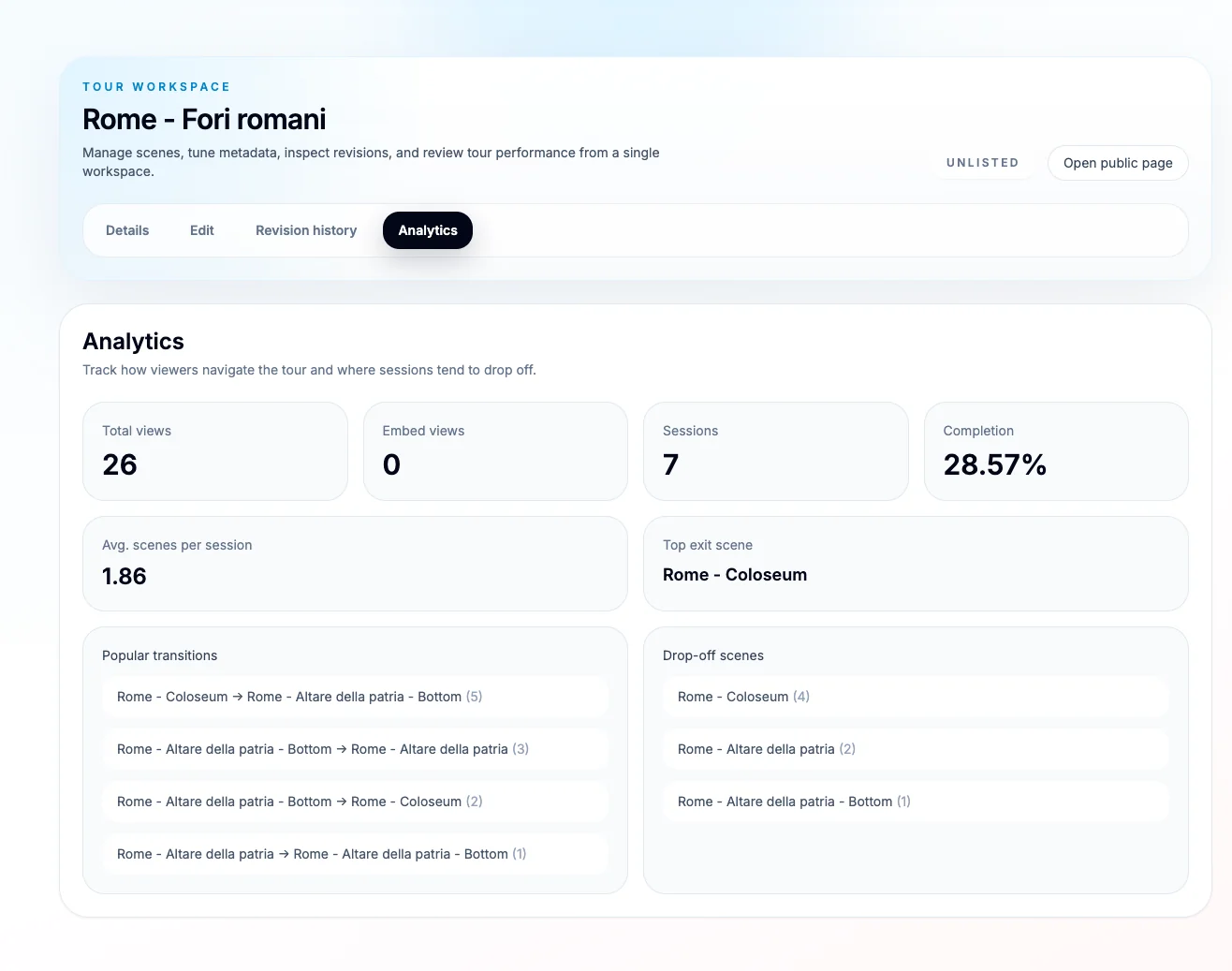
Mirame360 gives creators a complete tour workspace where they can manage, publish and analyze interactive 360° experiences.
Whether you are showcasing a travel destination, a museum, a hotel, a real estate property, an event, a restaurant, a school, or a historical location, Mirame360 Tours gives you a simple way to turn 360° content into something people can actually explore.
Why Single 360° Images Are Not Enough
360° media is powerful because it gives viewers freedom.
They are not forced to look only where the camera points. They can rotate, zoom, inspect details, and choose their own perspective.
But if the experience stops at one panorama, it often feels incomplete.
Imagine a 360° image of the Colosseum in Rome. It may be impressive, but after a few seconds the viewer has already looked around. What happens next? Can they move closer? Can they continue toward the Roman Forum? Can they jump to another viewpoint? Can they follow a path?
Without navigation, the answer is usually no.
That is the difference between a 360° image and a 360° virtual tour.
A 360° image shows a place.
A 360° tour lets people move through it.
Mirame360 was built to make that transition simple.
What Is a 360° Virtual Tour?
A 360° virtual tour is an interactive experience made from multiple connected scenes. Each scene can be a panoramic photo or 360° view. Viewers can look around inside each scene and click on navigation points to move to another location.
For example, a tour of Rome could include:
- A scene near the Colosseum
- A scene near the Roman Forum
- A scene near Altare della Patria
- A scene at the bottom of a monument
- A scene from a panoramic viewpoint
Each of these scenes becomes part of a larger journey. The viewer is no longer just looking at one image. They are exploring a place.
This is useful for many types of content:
- Travel guides
- Real estate walkthroughs
- Hotels and vacation rentals
- Museums and exhibitions
- Historical locations
- Restaurants and venues
- Schools and campuses
- Construction sites
- Event spaces
- Tourism boards
- Local businesses
A virtual tour gives context. It helps viewers understand how different places connect to each other.
How Mirame360 Tours Works
Mirame360 Tours provides a dedicated workspace where you can manage your virtual tour from one place.
Inside a tour workspace, you can organize scenes, edit metadata, connect locations, review revisions, publish the tour, and inspect analytics.
The workflow is simple:
- Create a tour
- Add your 360° scenes
- Give each scene a clear title
- Add clickable points
- Choose which scene each point should open
- Place the point visually inside the panorama
- Publish or keep the tour unlisted
- Track how people use it
This means you can build a real interactive experience without needing to create a custom website or manually code a viewer.
The tour editor is designed around the actual way people think about spaces: scenes, connections, destinations, and movement.
Connect Scenes with Clickable Points
The most important part of a virtual tour is navigation.
In Mirame360, you can add clickable points inside a scene and configure them to open another scene. For example, in a scene called Rome - Colosseum, you can add a point that sends the viewer to another scene such as Rome - Altare della patria - Bottom.
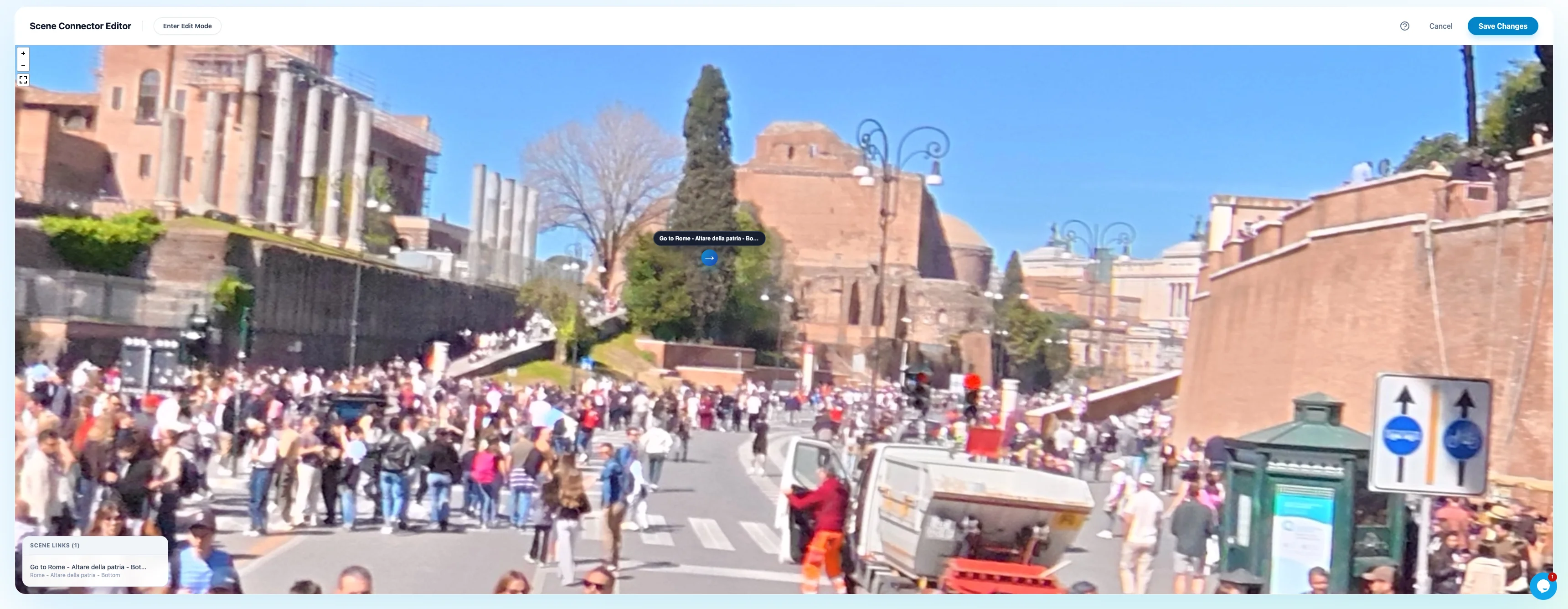
The scene editor lets you create clickable points and choose which scene each point should open.
This creates a natural path between locations.
The viewer does not need to use a separate menu or guess where to go next. They can simply look around the panorama and click the point that appears in the scene.
This makes the experience feel more immersive because the navigation is part of the 360° environment itself.
Instead of saying:
“Here is another image you can open.”
The tour says:
“Click here to continue moving through the place.”
That small difference changes the entire feeling of the experience.
Place Navigation Points Visually Inside the Panorama
Mirame360 also includes a visual connector editor. This lets you place the clickable point directly inside the 360° scene.
That matters because the position of a hotspot should make sense.
If a path continues forward, the clickable point should appear in front of the viewer. If the next scene is behind them, it should appear behind them. If the next viewpoint is near a building, monument, corridor, road, or doorway, the point should be positioned in that direction.
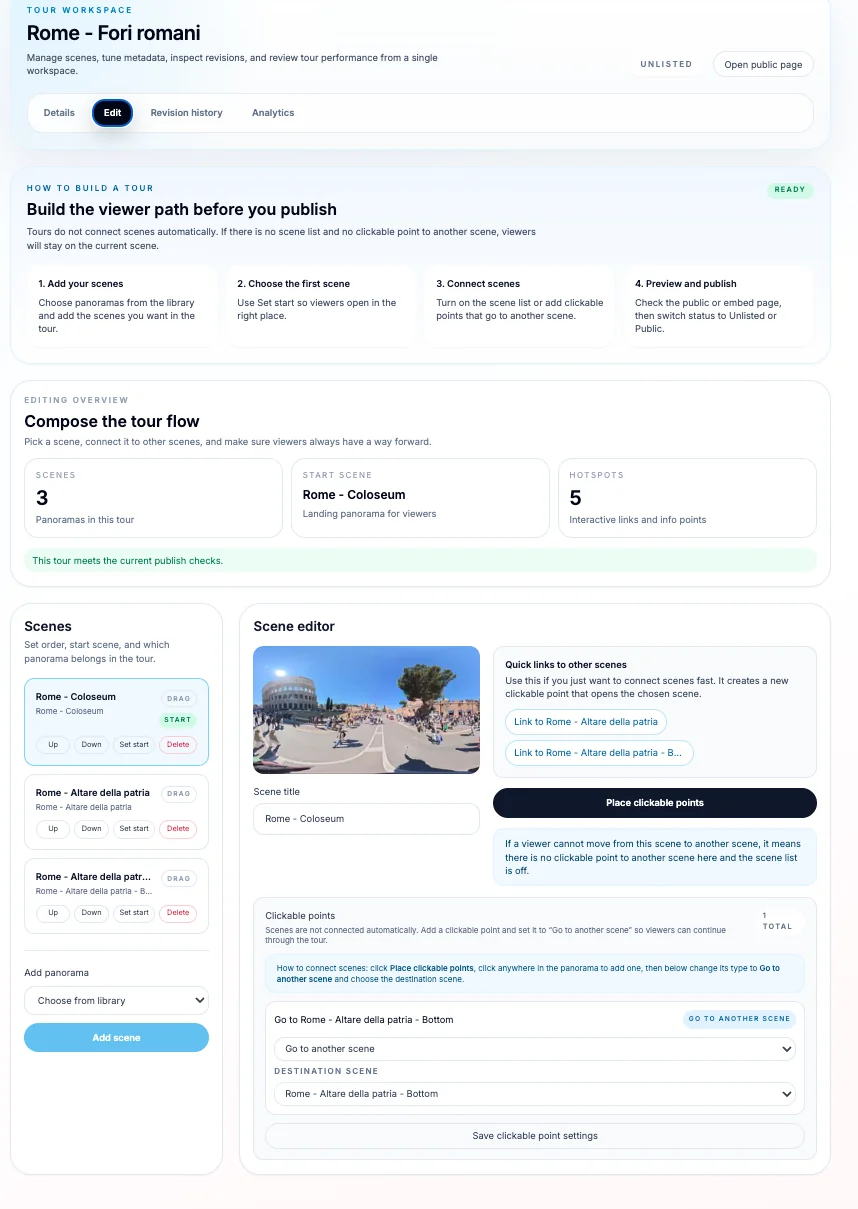
Clickable points can be positioned directly inside the panorama, making navigation feel natural to the viewer.
This makes the tour easier to understand.
Good hotspot placement helps viewers move naturally. Bad hotspot placement makes a tour confusing.
With the visual editor, you can place the point where it belongs, preview the scene, and adjust the experience until it feels right.
Build a Spatial Journey, Not Just a Gallery
A normal image gallery shows one image after another.
A 360° tour does something different: it gives the viewer a sense of space.
When scenes are connected correctly, the viewer understands where they are, where they can go next, and how different locations relate to each other.
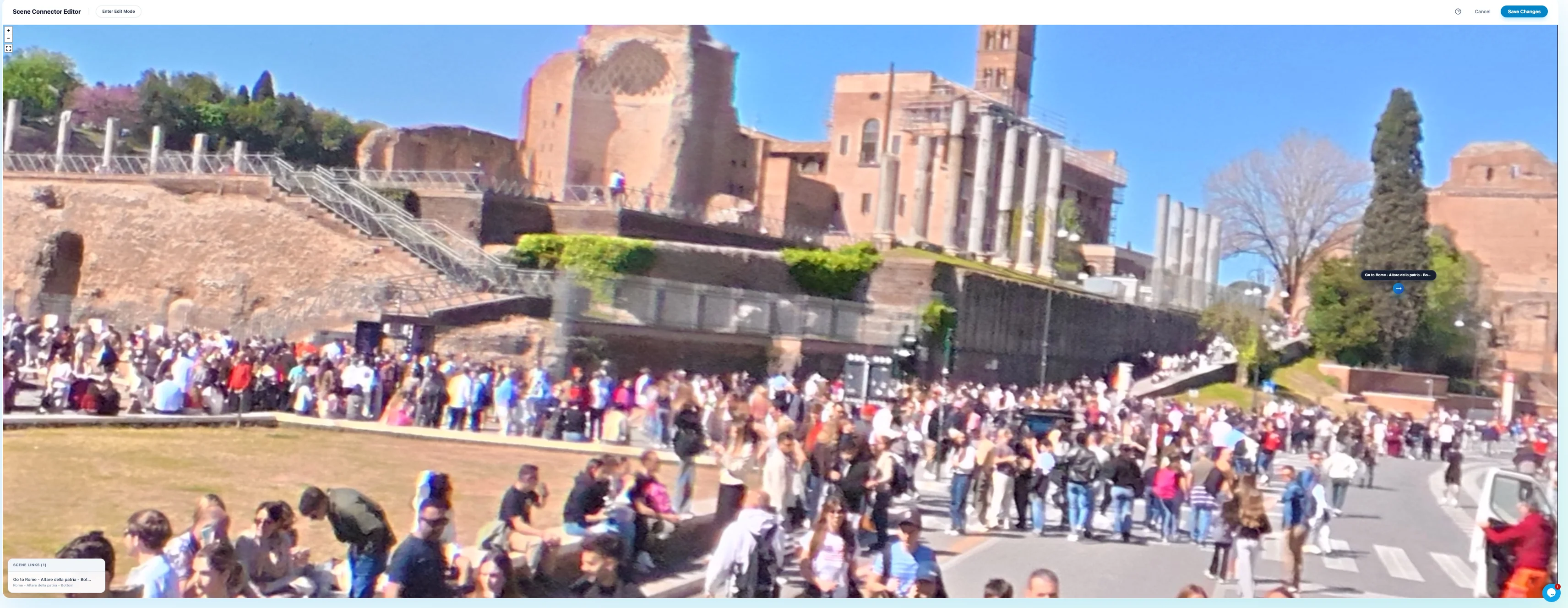
Mirame360 Tours help creators turn separate panoramic scenes into a connected journey through a real place.
This is especially powerful for travel, tourism and cultural content.
A viewer can start near a landmark, move toward another point of interest, continue through a square, and experience the location as a connected route.
For real estate, the same idea applies to rooms and corridors.
For hotels, it applies to rooms, lobbies, restaurants and terraces.
For museums, it applies to rooms, exhibitions and historical spaces.
The goal is always the same: help people explore instead of only observe.
Publish Publicly or Keep the Tour Unlisted
Not every tour is ready to be public immediately.
Sometimes you are still editing. Sometimes the tour is for a client. Sometimes you want to share it only with specific people before publishing it everywhere.
Mirame360 supports this workflow by allowing tours to be managed before publication and shared when ready.
An unlisted tour can be opened by people who have the link, without necessarily being promoted publicly. A public tour can be shared more broadly.
This gives creators more control.
You can prepare the tour, test the navigation, check the scenes, review the experience, and then decide when it is ready to share.
Embed 360° Tours on Your Website
A virtual tour becomes even more useful when you can place it where your audience already is.
With Mirame360, tours can be used as standalone public pages or embedded into other websites. This is useful for businesses, bloggers, tourism websites, real estate agencies, hotels, schools, and creators who already have their own online presence.
Embedding a tour can help turn a static page into an interactive experience.
For example:
- A hotel can embed a tour of its rooms and common areas
- A real estate agent can embed a property walkthrough
- A museum can embed an exhibition preview
- A travel blogger can embed a tour of a destination
- A restaurant can embed a 360° view of the dining room
- A school can embed a campus tour
- A local guide can embed a historical walking route
Instead of asking visitors to imagine the place, you let them explore it.
Understand Viewer Behavior with Analytics
Publishing a virtual tour is only the first step. The next question is: how do people actually use it?
Mirame360 includes analytics that help you understand viewer behavior.
You can track important signals such as:
- Total views
- Embed views
- Sessions
- Completion rate
- Average scenes per session
- Popular transitions
- Top exit scene
- Drop-off scenes
Tour analytics help you understand how viewers move through your 360° experience and where they drop off.
This is valuable because a virtual tour is not just visual content. It is an interactive journey.
Analytics help you understand where viewers go, where they stop, and which scenes are most engaging.
For example, if many people exit from the same scene, that scene may need a clearer navigation point. If viewers rarely continue past the first panorama, maybe the starting scene should be improved. If one transition is very popular, that connection may represent the natural path people expect to follow.
This turns tour creation into an iterative process.
You can publish, observe, improve, and make the tour better over time.
Edit Safely with Revision History
Editing a tour can involve many small changes: adding scenes, removing clickable points, changing destinations, updating titles, adjusting metadata, and improving navigation.
Mirame360 includes revision history so you can review recent changes and restore earlier versions if needed.
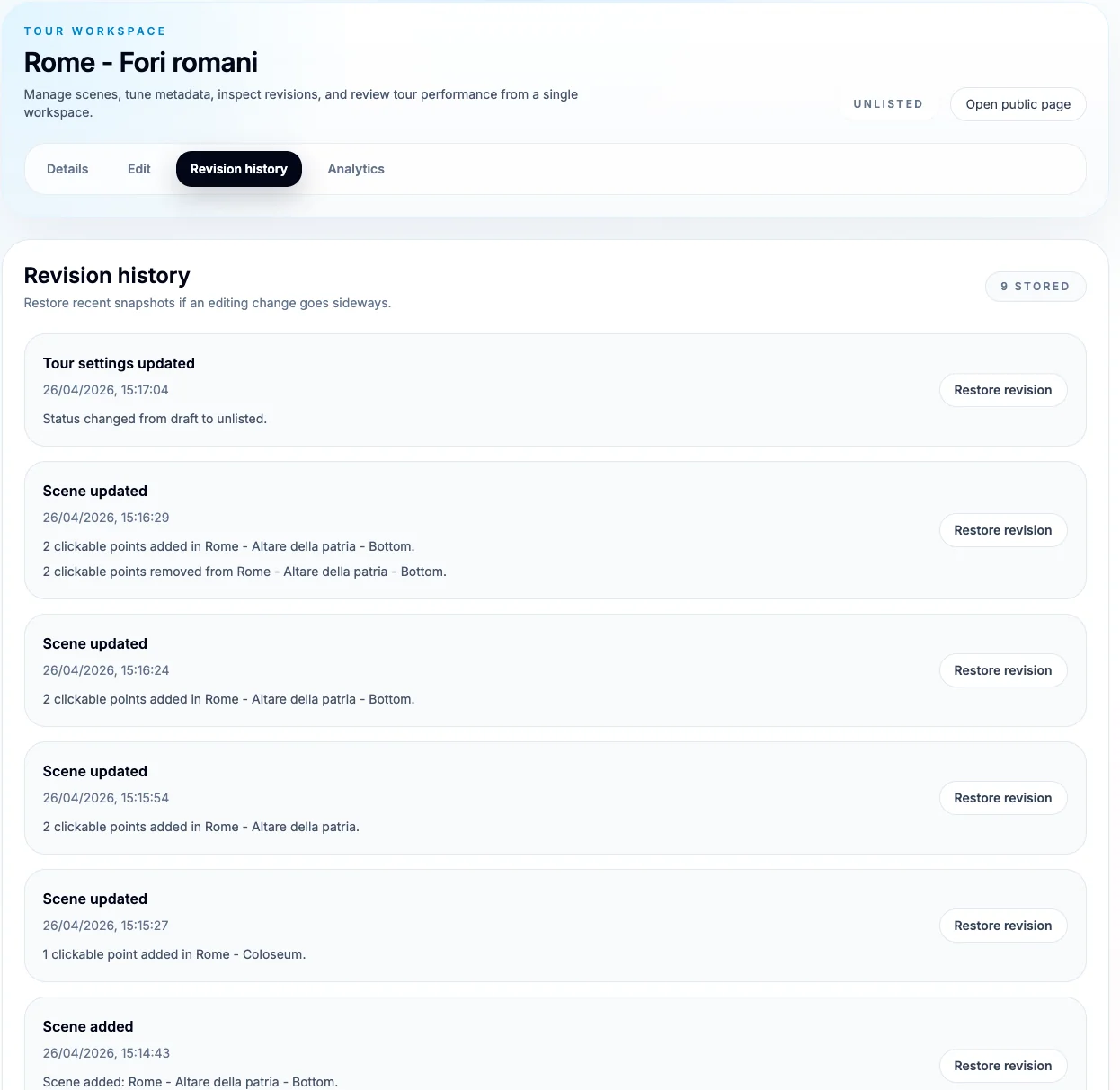
Revision history gives creators a safer way to edit tours, review changes and restore previous versions.
This is useful when working on more complex tours, especially if you are making many edits in a short period of time.
Revision history gives you confidence. You can experiment, improve the structure, add new clickable points, and adjust the experience without worrying that one mistake will ruin the entire tour.
For creators and businesses, this is an important professional feature.
A virtual tour is not always finished in one session. It often evolves.
Example: A 360° Tour of Rome
Imagine creating a tour called Rome - Fori romani.
The tour starts near the Colosseum. The viewer can look around the square, see the crowds, inspect the architecture, and feel the atmosphere of the location.
Inside the scene, there is a clickable point. When the viewer clicks it, they move to another scene near Altare della Patria. From there, another point can take them to a lower viewpoint, a different angle, or another part of the route.
Instead of showing three unrelated panoramas, the tour becomes a connected journey through Rome.
This is exactly the kind of experience that makes 360° content more useful.
It can be educational, promotional, documentary, or personal. A visitor can understand the relationship between locations, follow the path, and spend more time exploring.
That is the value of a tour: it gives structure to immersive media.
Who Should Use Mirame360 Tours?
Mirame360 Tours is useful for anyone who wants to make 360° content more interactive and easier to explore.
Travel Creators
Travel creators can use tours to build immersive destination guides. Instead of publishing only photos or videos, they can create interactive routes through cities, landmarks, viewpoints, and cultural locations.
Real Estate Agents
Real estate professionals can connect rooms, hallways, terraces, gardens, and entrances into a clear walkthrough. This helps potential buyers or renters understand the layout of a property before visiting in person.
Hotels and Vacation Rentals
Hotels, apartments, and holiday rentals can show rooms, lobbies, restaurants, pools, views, and common areas. A virtual tour can increase trust because guests can see the space before booking.
Museums and Cultural Spaces
Museums and galleries can create digital exhibitions that allow visitors to move between rooms or displays. This can be useful for promotion, education, accessibility, and online previews.
Local Businesses
Restaurants, gyms, coworking spaces, shops, studios, and venues can use tours to show their atmosphere. A 360° tour helps potential customers understand the space better than normal photos.
Schools and Universities
Educational institutions can build virtual campus tours for students and families. Visitors can explore classrooms, libraries, labs, outdoor areas, and facilities remotely.
Construction and Documentation
Teams working on construction, renovation, or site documentation can use tours to record progress and connect different viewpoints into a structured visual record.
Why Interactive Tours Increase Engagement
People engage more when they can choose what to explore.
A normal image is passive. A video is linear. But a 360° tour is interactive.
The viewer controls the direction, the pace, and the path. This creates a stronger sense of presence.
Interactive tours can also increase time on page because viewers naturally spend more time moving between scenes and looking around. For businesses and creators, this can make the content more memorable.
Instead of quickly scrolling past an image, the viewer becomes part of the experience.
That is why 360° tours are especially powerful for places where atmosphere matters.
A hotel room, a Roman square, a museum hall, a restaurant terrace, or a mountain viewpoint cannot be fully understood from one flat photo. A tour gives the viewer more context.
Tips for Building a Great 360° Tour
A good virtual tour should feel natural. Here are a few simple tips.
Start with the strongest scene
The first scene should immediately make people want to explore. Choose a viewpoint that is visually interesting and easy to understand.
Use clickable points where viewers expect them
Place navigation points in logical directions. If the next scene is down a path, place the point on that path. If it is inside a doorway, place it near the doorway.
Avoid too many points in one scene
Too many clickable points can confuse viewers. Give them useful choices, not visual clutter.
Use consistent naming
Consistent scene names make editing and analytics easier.
Check your drop-off scenes
If many viewers leave from the same scene, review that scene. It may need a clearer next step.
Test the tour like a visitor
Before sharing, open the public page and move through the tour as if you had never seen it before. Make sure the path feels obvious.
From 360° Media to Spatial Storytelling
The real power of Mirame360 Tours is not only technical. It is storytelling.
When you connect scenes together, you are creating a spatial story.
You decide where the viewer starts, what they can discover, how they move, and what path they follow. This can be used for practical information, tourism, education, marketing, or documentation.
A virtual tour can show:
- The atmosphere of a place
- The relationship between different locations
- The layout of a property
- The path through a monument
- The structure of an exhibition
- The feeling of being there
That is much stronger than a folder of separate images.
Mirame360 helps turn immersive media into an experience.
Start Building Your Own 360° Tour
If you already have 360° photos or videos, you can start turning them into a tour with Mirame360.
Create a tour workspace, upload your scenes, connect them with clickable points, and publish the result as an interactive experience.
You can keep the tour unlisted while you work, share it when it is ready, embed it on your website, and use analytics to understand how viewers explore it.
Your 360° content does not have to stay isolated.
With Mirame360 Tours, you can connect scenes, guide viewers, and transform panoramic media into a real virtual journey.