
The Antigravity A1 Follow Me bundle is an 8K 360° drone kit that uses a Watch Remote and Ring Remote to track and film a subject without the Vision Goggles. Announced on October 20, 2026, it offers a lower entry price than the original headset bundle, but the included battery and propeller guards change the aircraft's flying weight and practical limitations.
For cyclists, hikers and solo creators, the attraction is simple: record the whole scene and choose the view afterwards. Before buying, though, check what comes in the box, how you intend to fly, and the rules for the actual configuration you use.
This guide is based on manufacturer specifications and published reporting, not a hands-on Mirame360 test. Images: Antigravity.
What is the Antigravity A1 Follow Me bundle?
The A1 is a drone with a 360° camera system. The Follow Me bundle adds wearable controls for tracking and self-filming; it does not include the Vision Goggles or the original Grip Motion Controller. Antigravity also offers a separate accessory kit for existing A1 owners.
The manufacturer's announcement describes a Watch Remote, a Ring Remote, full-coverage propeller guards and a high-capacity battery. Check the exact contents and availability in your local store, since bundles can differ by market.
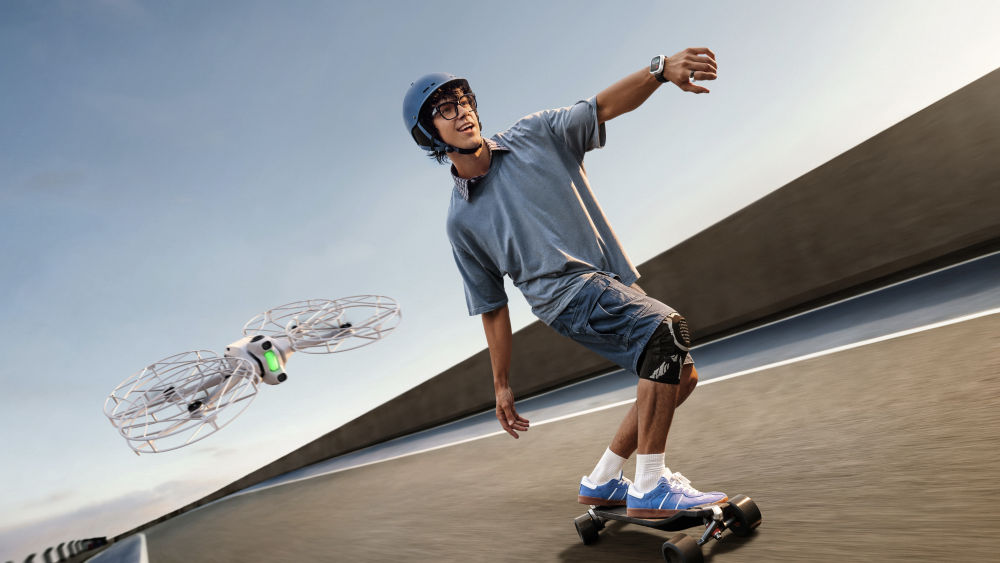
Image: Antigravity. The Follow Me setup combines wearable controls and full-coverage propeller guards.
At launch, DPReview reported a US price of $799 for Follow Me, compared with $1,599 for the original Standard bundle. The accessory-only kit was reported at about $340 before an existing-owner discount. Those are launch figures, not a guarantee of current pricing: taxes, promotions and availability vary.
How the Watch Remote and Ring Remote work
The Watch Remote puts a live camera view and flight controls on your wrist. Antigravity says its GPS data is combined with visual tracking to help the aircraft follow the wearer through movement and brief obstructions. DPReview reports a 1.7-inch screen and a maximum tracking speed of 10 m/s, or about 22 mph. Treat that as a specified maximum, not a promise that the drone will follow any route or keep up in every condition.
The Ring Remote adds gesture-based positioning. Antigravity calls this Drag-to-Fly: point toward the aircraft and use a button and arm movement to adjust its position. The intent is to change the composition without holding a conventional controller. Tracking and gestures still need room, suitable conditions and a pilot ready to intervene.
In its hands-on review, TechRadar praised the tracking and ring adjustments while noting the bulk of the guards and the lack of a conventional controller in this bundle. That is a more useful distinction than assuming an automated flight will work everywhere.
Tracking modes and practical limits
TechRadar tested the bundle while running, skateboarding and cycling and reported that the tracking worked well during those tests. The same review lists Deep Track, Orbit Follow, Cycling Track and Ski Track, alongside automated shots such as Fly Away, Oval Orbit and Spiral Ascent. These are useful starting points for solo footage, not a guarantee of collision-free flight. Choose an open route and leave room for the drone to stop or return.
The watch link is a separate specification from the A1's long-distance transmission figures used for other control setups. For Follow Me, Antigravity specifies a 360p/15 fps live view, roughly 300 ms average latency in its test conditions, and 150–200 m transmission in an open, interference-free environment. With obstructions and interference, it lists 20–50 m. These are manufacturer figures, not a safe operating distance or a substitute for local visual-line-of-sight requirements.
The same spec sheet lists a 1.72-inch watch display, more than five hours of watch tracking battery life and an IP67 rating for both the watch and ring. That water-resistance rating applies to the wearables; it does not establish that the drone is waterproof or suitable for flying in rain.
Does Follow Me require goggles?
No. Follow Me is designed around the watch and ring, without the Vision Goggles. That also means it does not include the immersive headset view associated with the original A1 setup. Antigravity announced a separate dual-stick controller, but says that controller requires the Vision Goggles; it is not the controller included in Follow Me.

Image: Antigravity. Vision Goggles and Grip belong to the original immersive setup and are not included in the Follow Me bundle.
Antigravity A1 camera specs: what 8K 360° gives you
According to the official A1 specifications, the camera records full-sphere video at 7680 × 3840 up to 30 fps, 5248 × 2624 up to 60 fps, or 3840 × 1920 up to 100 fps. It uses 1/1.28-inch sensors and f/2.2 lenses; the listed maximum video bitrate is 170 Mbps.
That 8K resolution covers the entire sphere. A reframed view uses only part of the image, so don't expect a cropped view to look like a conventional flat 8K frame. Full 360° and reframed flat video are different deliverables: the former lets viewers look around; the latter fixes the view you select during editing.
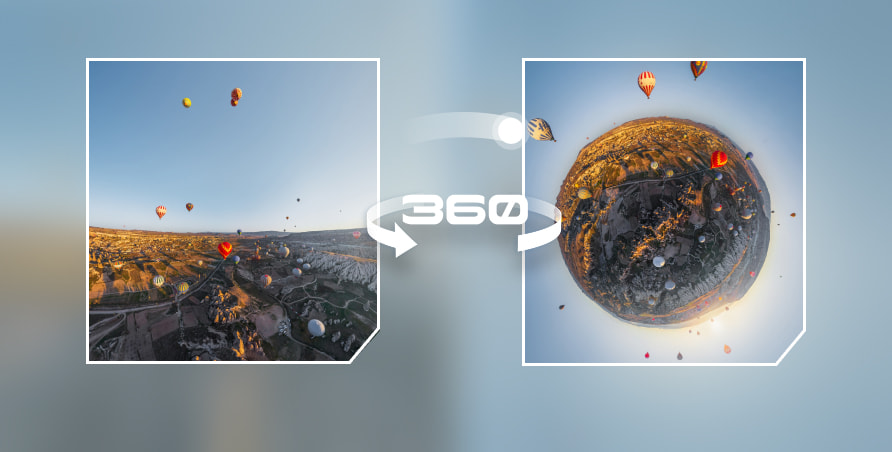
Image: Antigravity. A 360° recording can be presented in different views after the flight.
The weight catch: 249 g, 291 g or 351 g?
The A1's headline weight depends on what is attached. Antigravity lists 249 g with its standard battery and 291 g with the high-capacity battery in the base specifications. DPReview reports approximately 351 g for the Follow Me configuration with the high-capacity battery and full-coverage guards. These numbers describe different configurations; weigh the aircraft with every accessory installed before applying a weight-based rule.
Antigravity lists a C0 class for its standard-battery configuration and C1 for its high-capacity configuration. Check the actual class label and declaration for your aircraft and configuration: changing a battery or removing guards does not, by itself, establish the legal class of your aircraft.
The base A1 specification lists up to 24 minutes with the standard battery and 39 minutes with the high-capacity battery. For the Follow Me bundle configured with the high-capacity battery and full-coverage guards, Antigravity lists up to 23 minutes. That 23-minute result was measured without video recording, in windless conditions at 25°C, while flying forward until low-battery auto-landing. Real flights can be shorter.
In a hands-on Follow Me test, The Drone Girl reported shorter flights with the guards than the roughly 20 minutes previously experienced in a different configuration. That is one reviewer's observation, not a guaranteed runtime. Plan for a reserve and check battery warnings during each flight.
Check US and European rules before flying
In the US, the FAA's registration guidance distinguishes aircraft under 250 g flown recreationally from drones that must be registered; commercial Part 107 operations have their own requirements. Registration and Remote ID are not the only rules, so check the FAA guidance for your flight.
In Europe, EASA's open-category guidance distinguishes C0 and C1 requirements. A camera-equipped C0 drone can still require operator registration; C1 operations require operator registration and A1/A3 online training and an exam under the conditions shown by EASA. Check your national aviation authority, local flight restrictions and the actual aircraft label. Do not assume that a drone below 250 g has no obligations.
Obstacle sensing and propeller guards do not make a flight risk-free. The A1 specification describes forward and downward vision sensors plus downward infrared sensing, with operating limits that depend on visibility and surface conditions. Keep a suitable distance from people and obstacles, maintain the required visual contact, and follow local rules even in automatic modes.
Exporting and sharing A1 360° footage
The A1 records video as INSV files; Antigravity lists its app and Antigravity Studio as export tools. After a flight, first keep the original files, then export a short sample with the manufacturer's software. Choose a full 360° equirectangular export when you want the audience to look around. If you instead choose a reframed flat clip, viewers see the angle you selected rather than an interactive sphere.
For a browser-ready 360° version, inspect the exported file's projection and metadata, then test it in a compatible player. Mirame360's Metadata Doctor can check supported video files; the 8K 360° hosting guide explains the trade-offs around compression, upload limits and playback. Compatibility depends on the actual exported file: do not assume a raw INSV file can be uploaded directly.
Try a short clip first, especially if it's 8K. Compare the original export and hosted playback on a phone and a computer, pan around the scene, and check the stitching and fine detail. Save the original recording even after creating a web version.
Antigravity A1 Follow Me vs DJI: which should you buy?
Our verdict: the A1 Follow Me is a good buy if you want a 360° drone to follow your outdoor activities and you plan to use the full-sphere footage. If you only need a conventional video of yourself, the DJI Neo 2 is the better-value starting point. If you want 360° footage but prefer traditional stick control, compare a DJI Avata 360 bundle before deciding.
This is an editorial assessment based on published specifications and independent reviews; Mirame360 has not flown these models for a side-by-side test. Compare complete kits in your own market, including the controller, batteries and accessories you need. Prices and availability change.
| Drone | Best reason to choose it | Main compromise |
|---|---|---|
| Antigravity A1 Follow Me | Wearable controls and 360° capture for activities, with the freedom to reframe later | No goggles or traditional stick controller in this bundle; 351 g with battery and guards; shorter guarded flight time |
| DJI Avata 360 | 360° capture with traditional controller and FPV options, depending on the kit | Compare the price of a complete kit; goggles and controllers are not necessarily included in a drone-only offer |
| DJI Neo 2 | Lower-cost automated following for conventional flat video | No full 360° recording or interactive spherical playback |
A1 Follow Me vs DJI Avata 360
Choose the A1 Follow Me if you value having the watch and ring ready for a cycling or hiking session without putting on goggles. The Avata 360 is the stronger candidate if you want to direct the aircraft with a conventional controller or choose between a standard-control and an immersive FPV kit. Both can capture 360° footage, so the decisive question is how you want to fly and edit, not simply which is labelled 8K.
TechRadar's comparison tested the original A1 and Avata 360 before the Follow Me bundle existed; it is useful for the aircraft and camera comparison, but its A1 bundle and price conclusions should not be applied to the newer kit. The A1's official maximum is 8K/30 fps, while the review reports 8K/60 fps for Avata 360. Frame rate alone does not determine image quality. Our DJI Avata 360 guide has more background.
For a concrete price check, Frandroid reported both the A1 Follow Me bundle and an Avata 360 kit with DJI RC 2 at €719 in France in October 2026. That's a useful like-for-purpose reference, not a promise that prices match elsewhere or today. The two kits provide different controls and contents; inspect the retailer listing before comparing totals.
A1 Follow Me vs DJI Neo 2
Choose the Neo 2 if you want quick, conventional clips and low cost matters more than 360° editing. In its October 2026 Follow Me review, TechRadar listed the Neo 2 basic kit at $259 and the A1 Follow Me at $799 in the US. These are observed figures from a review, not current universal prices. The Neo 2 is not a 360° drone, so it cannot offer the A1's full-sphere interactive output or allow the same range of reframing after the flight.
Buy it, skip it, or upgrade?
- Buy the A1 Follow Me if you routinely film activities alone, want 360° capture and accept wearable controls, the size of the guards, and the rules and flight time for the 351 g configuration.
- Choose the Avata 360 instead if full 360° recording matters but you prefer sticks or already own compatible DJI equipment. Verify the total cost and compatibility of the specific kit before ordering.
- Choose the Neo 2 instead if a flat video is enough and a less expensive follow-me setup matters more than capturing every direction.
- Already own an A1? Price the accessory-only kit before buying another drone. Check exactly which accessories are included, and how the added battery and guards affect your configuration.
For a first-time buyer who is unsure whether they will use the 360° recording, the A1 Follow Me is hard to justify over a cheaper conventional tracking drone. For someone who will actually publish interactive 360° flights or make several reframed edits from each outing, the A1's added creative flexibility makes its premium easier to justify. Check local availability, the latest price and registration requirements before buying.
Once you have an exported 360° sample, create a Mirame360 account and test how it looks as an interactive browser experience before sharing the full flight.